Activities: Triggers from TikTok Live
An Activity answers when. It watches your live, and as soon as an event matches its rule, it runs the Interaction you've pointed it at.
Creating an Activity
- Open the Interaction Center menu.
- Click the [+ Activity] button.
- Fill in the three essentials: who the target is, what the trigger is, and which Interaction runs.
- Save.
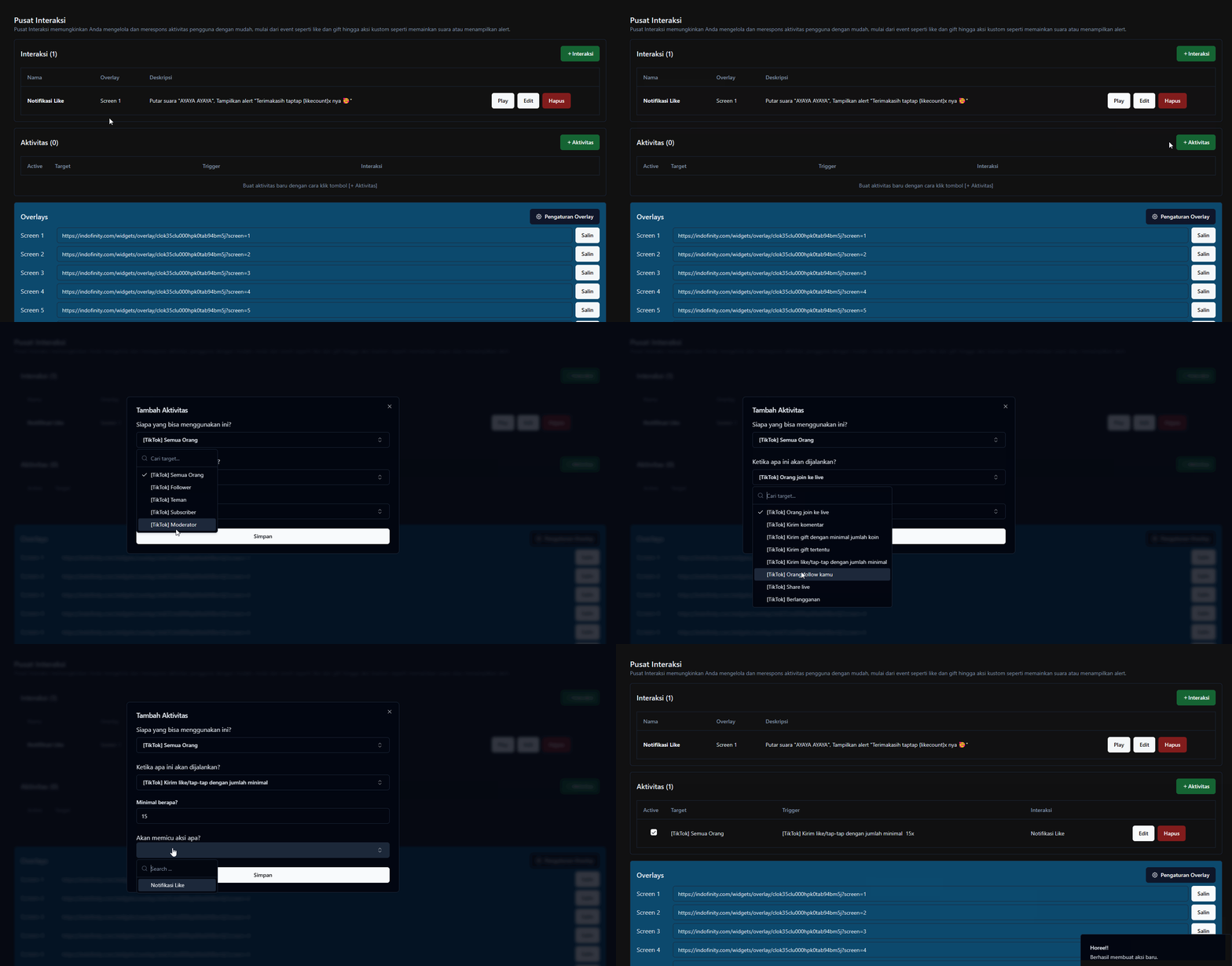
Who can use this?
| Target | Who |
|---|---|
| Everyone | Every viewer, no conditions |
| [TikTok] Follower | People who follow you |
| [TikTok] Friend | People you follow each other with |
| [TikTok] Subscriber / SuperFan | Your paying TikTok members |
| [TikTok] Moderator | Your live moderators |
Restricting the target is the simplest way to build exclusive features, for example song requests for Subscribers only, or Minecraft commands for Followers only.
When will this be executed?
From TikTok Live
| Trigger | Runs when |
|---|---|
| [TikTok] Person joins live | A viewer enters the live |
| [TikTok] Send comment | Any comment comes in |
| [TikTok] Send specific comment | A comment contains the Keyword you set |
| [TikTok] Send gift with minimum coin amount | Any gift reaches the minimum coin value |
| [TikTok] Send specific gift | The specific gift you pick |
| [TikTok] Send like/tap-tap with minimum amount | Taps reach the threshold |
| [TikTok] Person follows you | Someone follows |
| [TikTok] Share live | Someone shares the live |
| [TikTok] Subscribe | A new subscriber |
| [TikTok] Send fan club sticker in comment | A specific membership sticker appears in a comment |
Every viewer who enters triggers it. If its Interaction shares a Screen with other alerts, those alerts can be delayed or dropped. Give this action its own Screen.
Only the first sticker in a comment is processed. Repeats within one comment are not supported.
From donation platforms
Seven platforms can act as triggers: Saweria, Sociabuzz, Trakteer, Tako, BagiBagi, Sibagi, and TipTap.
For these you can fill in Enter donation amount (money). You can also choose Range of quantity (min - max) if you want different actions for different amounts.
Donation triggers only work once the platform is connected in the Donation Integration menu. Creating the Activity alone isn't enough.
Choosing which Interaction fires
There are two fields, and the difference matters:
| Field | Behavior |
|---|---|
| What action will be triggered? | Every Interaction you select runs |
| Trigger one action randomly | Only one from the list runs, picked at random |
If you set a fixed action and a random action, the dashboard warns you: "You choose to trigger fixed action and random action, please choose one." Both will run. Only ignore the warning if that's what you want.
Random actions are useful for variety, for example five different sounds for the same gift so it doesn't get repetitive.
Other settings
| Setting | What it does |
|---|---|
| Active | Disables the Activity without deleting it |
| Minimum amount? | The threshold for gift-coin and like triggers |
| UID Queue | Makes this Activity fire only when the system detects a UID in the text. Used by the UID Queue feature |
Common problems
Symptom: the gift Activity doesn't run even though gifts arrive. Check Minimum amount?. If it's set to 10 coins and viewers send 1-coin gifts, the Activity correctly doesn't fire.
Symptom: the alert appears long after the viewer sent the gift. That's combo behavior. Open the Interaction and tick Repeat as many times as the gift combo. See Interactions.
Symptom: donation Activities never run. The platform isn't connected yet in the Donation Integration menu.